Sellers are hitting the bid. Is price going anywhere?
Pressure Pulse adds up buying and selling across the price ladder. Keep the net volume beside the chart so you can see when selling pushes price lower, or when the price holds despite it.
$0 today. Then $149/month unless canceled before the 15-day trial ends.
TRY THE COMPARISONIllustrative numbers
The same net selling. Two price responses.
Choose a price response while the executed volume stays the same.
Bought
400
Sold
650
Net contracts
−250
Tracking start−6 pts from start
Selling exceeds buying by 250 contracts, and price is 6 points lower than its starting price.
These are example executions and price moves, not a live reading or a suggested trade.
READING NQ AND MNQ ORDER FLOW
What do buying pressure and volume delta mean?
Order-flow analysis examines trading activity as it happens. Pressure Pulse focuses on executed contracts in the selected NQ or MNQ market. The ladder groups that activity by price so you can see where the classified buying and selling took place.
Every execution has a buyer and a seller. “Bought” and “sold” here describe the classified side of the trade flow. They do not mean one side of the transaction was missing. Unclassified contracts are shown separately.
The net contract count is classified bought volume minus classified sold volume for the stated window or region. With 400 bought and 650 sold, net volume is −250 contracts.
That number measures the difference in executed volume. The price response remains a separate observation: the market can fall, hold or rise during net selling. Use the price-response example above to compare two outcomes with the same totals.
Resting bid and offer size describes orders currently displayed in the book. Orders can be added or canceled before a trade occurs. CME’s order-book methodology explains that distinction.
INSIDE THE WORKSPACE
Keep the executions beside the price move.
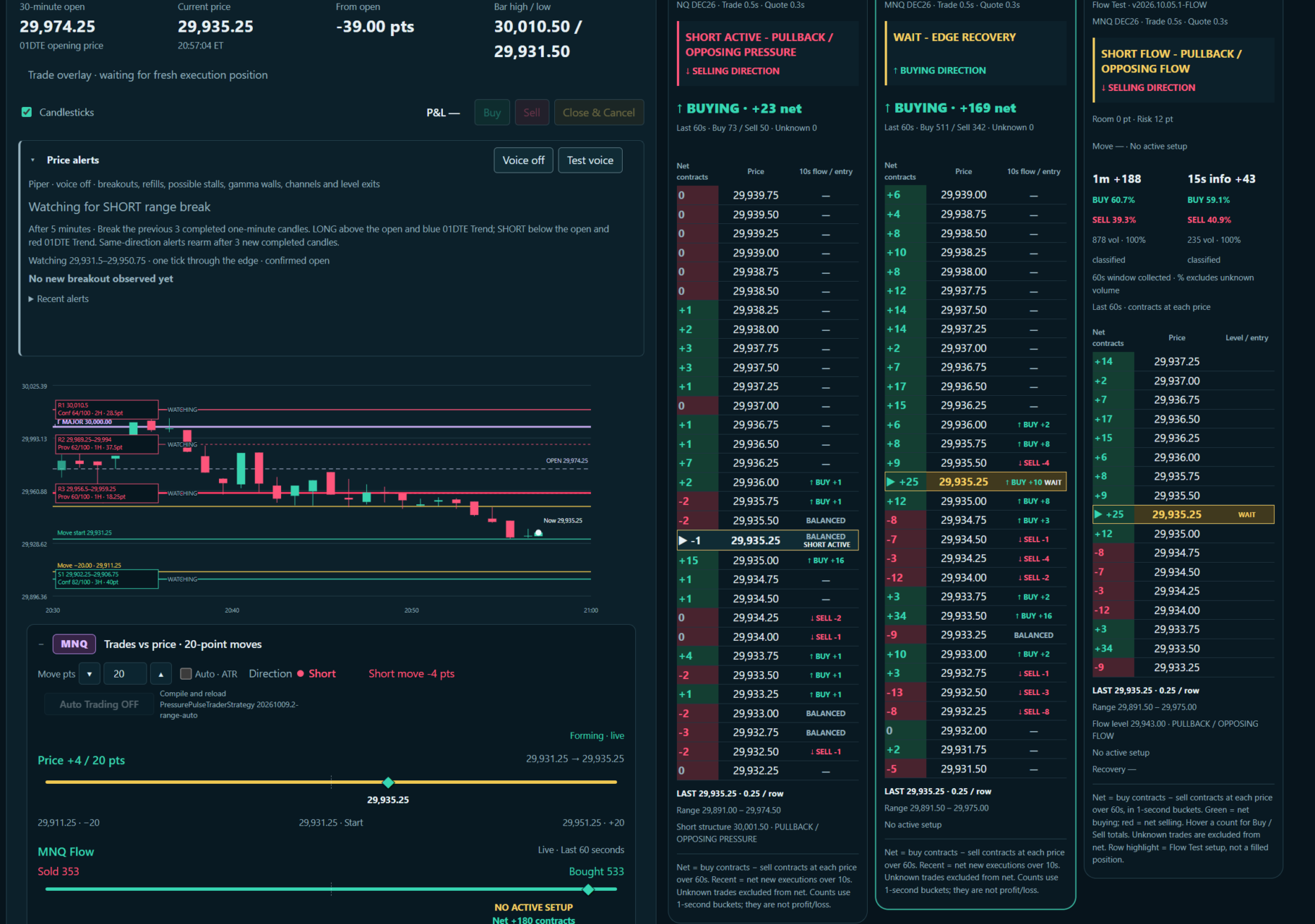
The NQ and MNQ ladders show where contracts traded. Beside them, the chart and flow gauges let you compare that activity with price movement from a visible starting point.
Actual workspace capture: price and flow gauges on the left, with NQ pressure, MNQ pressure and MNQ Flow alongside. The displayed readings belong to this capture. Click to view the full-size screenshot.
THE WHOLE LADDER
See whether selling is building across prices.
A single price row only shows part of the activity. The ladder shows classified buys, sells and net contracts across the displayed prices, while the combined ladder totals let you compare the red and green sides.
Use the one-minute reading with the five-minute context.
The shorter reading shows recent buying and selling. The five-minute view lets you compare it with the pressure already built up across the ladder. Both change as fresh executions arrive.
Compare Pressure and Flow on the same screen.
They apply different calculations to the same trade stream; Flow is experimental. Watch agreement or disagreement alongside price; unclassified volume is kept separate.
ONE-MINUTE AND FIVE-MINUTE PRESSURE
How to read the red and green ladder totals.
Each price row has a net contract value for its time window. The condensed bar adds the positive rows on the green side and the negative rows on the red side. It lets you compare pressure across the displayed ladder.
Illustrative one-minute ladder with three price rows
Price
Net contracts
Added to
30,100.50
+70
Green total
30,100.25
−45
Red total
30,100.00
+15
Green total
These rows produce +85 on the green side and −45 on the red side, for a combined net of +40 contracts. The green total is the sum of positive row nets. It is not the gross number of contracts classified as bought.
Compare recent pressure with the five-minute context.
The one-minute total can turn toward buying while the five-minute total still reflects earlier selling. Their windows overlap, so adding the one-minute and five-minute figures would count some executions twice.
Older trades leave a rolling window as time passes. The totals also refer to the displayed price rows; a moving ladder can bring different prices into view.
Keep the cumulative trackers separate.
Trend-ray trade counts accumulate from the tracked starting point. Their totals cover a different period and region from the ladder’s rolling windows.
Read the instrument, time window and tracking status before comparing two numbers. NQ and MNQ have separate execution streams, even when their prices move closely together.
EXECUTED TRADES AROUND THE TREND
Is the selling below that red line moving price?
A red ray describes a falling trend. The trades below it can still show net buying. Pressure Pulse gives you the bought, sold and net contract totals, then a separate gauge shows how far price has moved.
Track each ray separately
The red row counts classified executions below the tracked red ray. The green row counts executions above the tracked green ray. When both rays are present, both rows can run. Trades between the rays may count in both rows, so you should not add the rows together.
Keep the starting point visible
Counts accumulate from the start of tracking that ray. Each row records the tracking time, first qualifying execution, its price and its distance from the ray. The gauge compares current price with that first execution: green above the start, red below it.
Contract totals describe market executions, not your account’s fills. Delayed data and interruptions are labeled.
READ THE MARKET, THEN CHOOSE YOUR ORDER
View the shared tape in your browser.
Select NQ or MNQ and check the trade, quote and publisher ages. Interrupted tracking is labeled so you can tell when a total covers only part of the session.
For manual entries from the page, connect your own NinjaTrader desktop through the member connector. Execution approval is required; live accounts require live approval. Read the connection requirements.
01DTE MEMBERSHIP
Compare the pressure during your own sessions.
Use the trial to follow the ladder, check the combined totals and track executions around a trend ray. Decide whether the price response supports your reading before using it in your routine.
Gamma Force and the SPX GEX view
Pressure Pulse with NQ / MNQ executed volume
Market Auction and multi-timeframe trend analysis
Market coverage varies by tool. Manual order entry requires a separate NinjaTrader connection and approval.
Are these executed trades or orders waiting in the book?
The Pressure and Flow ladders count executed contracts classified as buying or selling. Resting bid and offer size is a different measurement.
What does the net number tell me?
Net is bought contracts minus sold contracts in the stated window or tracked region. Price movement is shown separately, in points. A negative net does not require price to fall.
Do trend-ray counts reset every minute?
They accumulate from the start of tracking the ray. The tracker shows its starting time and first execution. The ladder’s rolling windows are separate readings.
Do I need NinjaTrader to use the website?
You can view the shared market readings in the browser. Placing manual orders from Pressure Pulse requires your own NinjaTrader connection, the member connector and execution approval. Live accounts require live approval. Review the setup requirements.
What happens after the trial?
The 15-day trial is $0 today and continues at $149/month unless you cancel before it ends. Review the subscription terms at checkout. You can also compare the other access options.