Skip to content
01DTE

THE 01DTE TRADING WORKSPACE

Watch the pressure change
as price reaches your levels.

You have a price in mind. As the market approaches it, check the larger NQ swing and the buying and selling along the way. You can also inspect futures options levels or open the dedicated SPX gamma view.

$0 today. Then $149/month unless canceled before the 15-day trial ends.

FROM A RECORDED NQ SESSION

Follow the visits to 31,089.75.

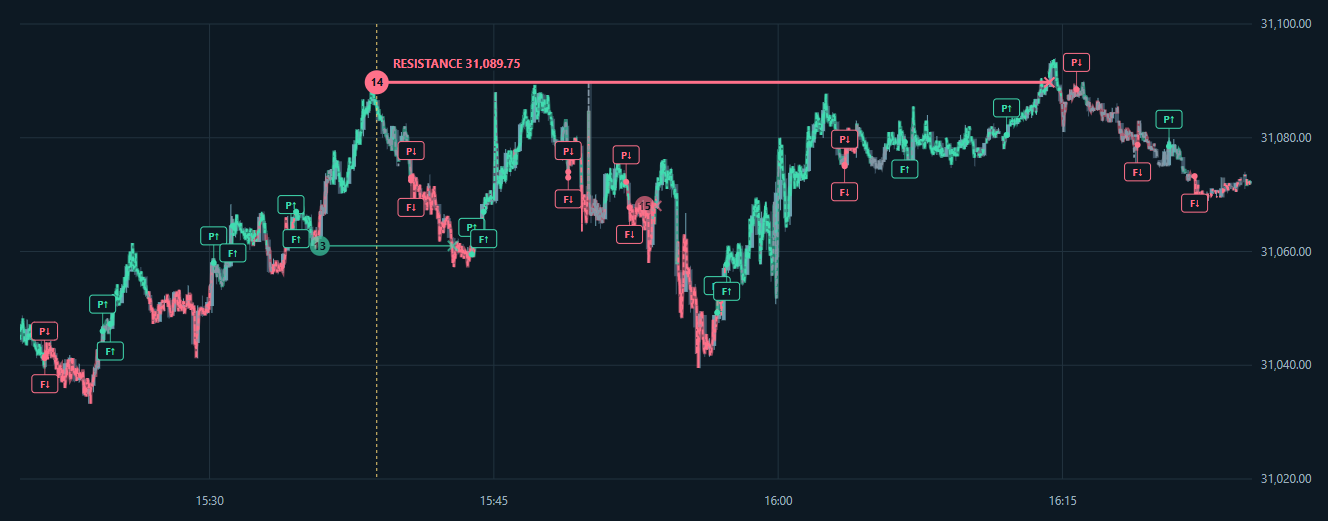
In this October 2 recording, price returns to the marked resistance several times. Compare each visit with the Pressure and Flow direction markers, then follow the candles afterward.

Recorded NQ chart showing repeated visits to resistance at 31,089.75 and P and F markers for Pressure and Flow direction changes.
Actual recorded NQ session, October 2, 2026, 15:20 to 16:25 ET. Historical readings, not live data or a performance result. Click the chart to enlarge it.

The horizontal levels record observed absorption support and resistance. Price can revisit a level or trade through it as the session develops.

P and F mark Pressure and Flow direction changes. They describe market readings; they are not entries, exits or fills from a trading account.

WHAT YOU CAN DO WITH 01DTE

Follow the swing and the trading around it.

A three-minute rally can still be approaching a larger falling trend. Market Auction keeps that structure visible while Pressure Pulse shows the trading around it. The options views give you nearby concentrations to inspect as price moves.

NQ PRICE STRUCTURE

Market Auction

Explore NQ trend analysis

Keep the larger swing in view while the short chart moves.

Pick the swing high and low you want to follow. Market Auction traces that structure through the four-hour, one-hour, 30-minute, 15-minute and three-minute charts. Your chosen starting points remain the reference as you inspect the latest rally.

Red rays descend from highs and green rays rise from lows. Both can appear when the market has competing structures. Fresh prices and candles update the analysis during the session. Watch price approach a ray, then follow what happens at the line.

The selected-range gauge keeps current price in view between your range boundaries. A separate HalfTrend overlay adds another price reference. Developing lines can change. Check their timeframe and data status as you follow them.

NQ / MNQ EXECUTED TRADES

Pressure Pulse

Explore order flow and pressure

Compare net selling with the price response.

The pressure ladder groups classified buying and selling by price. Its net contract counts show which side has traded more in the stated window. The condensed totals let you compare the red and green rows across the displayed ladder, with one-minute pressure against five-minute context.

The price chart lets you see whether the market is falling, holding or rising during net selling. Pressure and the experimental Flow view use the same trade stream and apply different calculations; you can inspect their agreement or disagreement against the chart.

You can also count executions below a red trend ray or above a green one. Those totals accumulate from the tracking start. The gauge measures price movement from the first qualifying execution, so you can compare the growing count with how far price has moved.

OPTIONS LEVELS

Gamma Force

Explore options gamma levels

Choose which options levels deserve a closer look.

Gamma Force ranks options gamma concentrations and places the levels around current price. You can see what is nearby, then open the strike table to compare the call and put data behind a concentration.

For a futures trader, the mapped levels add options context to the price chart. When price approaches one, watch whether it stalls, passes through or moves away. The level identifies the concentration; it does not tell you that price will reverse there. Coverage varies by market and available options data, and the view shows update times.

SPX OPTIONS ANALYSIS

SPX GEX

Explore SPX GEX and the flip

Put the gamma estimate on the SPX price scale.

The dedicated SPX page shows estimated net gamma exposure for today’s SPXW expiration. A modeled curve shows exposure across a range of SPX prices, and the gamma flip marks a crossing through zero when one is found.

The distance readout shows how many points separate SPX from the flip. Follow it alongside the SPX chart and nearby strike concentrations as fresh data arrives.

These are estimates based on options data and position assumptions. The page labels coverage and update times, including retained snapshots when fresh data is insufficient. The positive and negative gamma explanation covers how to interpret the sign.

USING THE WORKSPACE

Start with the market you trade.

Keep your existing chart open and choose a situation you want to follow. An NQ rally toward a trend ray calls for a different view from SPX approaching its modeled gamma flip.

During an NQ or MNQ session

Suppose NQ starts rallying toward a descending ray you’re watching. Open the trend view to check where that rally sits within the selected swing.

Next, follow the execution stream for the contract you trade. Watch the ladder as price approaches the area. If you’re tracking trades around the ray, compare the growing net count with the price-change gauge.

A net-selling count with price holding gives you a different observation from net selling with a continuing decline. You still choose the entry, stop and position size using your own rules.

During an SPX session

Check the current gamma estimate and its timestamp, then locate SPX relative to the modeled flip. Inspect the nearby concentrations on the SPX chart.

As the session develops, recheck both price and the estimate. The flip can move when fresh quotes change the model. Read any retained snapshot with its displayed time.

NQ and MNQ execution counts describe their own futures markets. Use the dedicated SPX view for SPX options data.

SETUP AND ACCESS

Use the analysis in your browser.
Connect NinjaTrader if you want manual orders.

The member workspace

Sign in to view the shared market readings. Your saved chart preferences and picked swing starting points belong to your account.

Check the instrument and data ages before using a reading. Tracking can pause when fresh quotes or executions are unavailable, and interrupted counts are labeled as partial.

Optional manual execution

Placing manual orders from Pressure Pulse requires NinjaTrader on your computer, the member execution connector and execution approval. Live accounts require separate live approval.

The connector must be installed, connected and ready before the page can submit an order. Pressure and Flow readings do not place trades for you.

Read the NinjaTrader connection requirements before setting up order entry.

01DTE MEMBERSHIP

Put it beside your charts
for the next 15 days.

Choose the market you follow, then use the same view through several sessions. Check whether the trend references and trade counts answer questions you already ask before an entry. For SPX, follow the gamma estimate and its distance from the flip as the session develops.

  • Gamma Force and the SPX GEX view
  • Pressure Pulse with NQ / MNQ executed volume
  • Market Auction and multi-timeframe trend analysis

One membership includes these tools. Manual order entry has separate connection and approval requirements.

15-DAY FREE TRIAL

$0 today

Then $149 / month

Start my 15-day trial

$0 today. Then $149/month unless canceled before the 15-day trial ends.

Compare access options

BEFORE YOU JOIN

Questions about membership

Are all four tools included?

Gamma Force, Pressure Pulse, Market Auction and the dedicated SPX GEX view are included in the membership described here. Market and data coverage vary by tool.

Do I need to trade options?

You can use options-derived levels while trading futures. NQ and MNQ pressure show futures executions. The dedicated SPX GEX page is for traders following SPX options exposure.

Does a level score tell me the chance of a winning trade?

A relative gamma score ranks the concentration. A support or resistance evidence score describes observed tests and reactions. Neither is a win probability, and a level can fail after a previous reaction.

Are the two pressure readings independent confirmation?

Pressure and Flow use different calculations on the same Time & Sales stream. Flow is experimental. Agreement between the readings is not confirmation from two independent data sources; compare it with price.

Do I need NinjaTrader just to view the analysis?

You can view the shared readings in the browser. Your own NinjaTrader connection and execution approval are required for manual orders from Pressure Pulse.

What happens after the free trial?

The 15-day trial costs $0 today and continues at $149/month unless you cancel before it ends. Review the subscription terms and other access options at checkout.

Where can I ask about my setup?

Use the contact page to ask about your market or connection requirements before subscribing.